

 Sprawdzenie wirusów
Aby pobrać aplikację na iPhone, zeskanuj ten kod QR.
Jak poprawnie zainstalować aplikację na iPhone?


Prywatność aplikacji
Praktyki prywatności mogą się różnić w zależności od takich czynników, jak Twój wiek, używane funkcje lub inne czynniki. Więcej
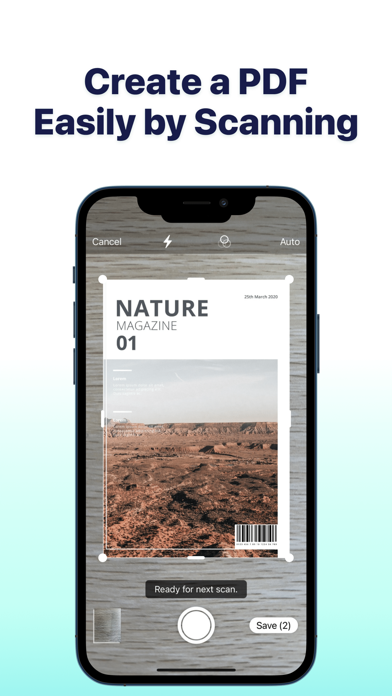
SwifDoo PDF is a versatile PDF reader and annotator that combines the functionalities of annotating PDFs, reading PDF documents, and serving as a PDF reader. With SwifDoo PDF, your mobile device becomes a fully featured and powerful mobile PDF Office, making it convenient for you to read and work with PDF files on your smartphone and tablet. Learn how to annotate a PDF with SwifDoo PDF, your all-in-one PDF reader and annotator. Key features of SwifDoo PDF: Read PDF Simple Mode that hides all the toolbars and task panes for better PDF reading experience Search for words and phrases in PDFs and quickly jump to specified locations Automatic text-to-speech feature to read PDFs aloud with multiple languages and human voices Document reformatting supported: change the background color or image of your PDF, change the font size, and do more to relax your eyes and read joyfully Support viewing various files such as PDF, Word, Excel, PowerPoint, eBooks, images, and more Annotate PDF A set of annotation tools to underline, strikethrough, and highlight text in PDFs. Also add notes, shapes, text boxes,and freehand drawings to PDFs. Easily view all annotations from the quick navigation bar and annotation panel Add predefined or custom stamps to PDFs, and create dynamic stamps with the date, and time information Reorder, rotate and delete PDF pages in just a few clicks Convert PDF Convert PDF to Word, PowerPoint, Excel, CAD, and image formats. Convert Office documents, drawings, and images to PDFs without losing quality. Merge & Split PDF Combine two or multiple PDF files into one in the order you want. Split a PDF into several smaller files evenly, every X page, or by entering the page ranges. Compress PDF Compress a PDF file to reduce the file size by three compression levels. Customize image quality and resolution for PDF compression. Import PDF - Transfer PDF files from your computer to your phone for more convenience file. - Built-in scanning feature turns your phone's camera into a scanner, effortlessly capturing photos and converting them into PDFs. Search PDF - Find PDF files on your device easily in a click. In-App Purchase Details Subscription Plan: Quarterly plan and Annual plan, and the new users enjoy a 7-day free trial Subscription Payment: Once the purchase is confirmed, payment will be deducted from your iTunes account Subscription Renewal: Within 24 hours before the subscription expires, payment will be deducted from your iTunes account, and the membership will be automatically extended upon successful payment. Canceling Renewal: Within 24 hours before the current subscription expires, go to Subscription in iTunes Apple ID settings to click “Cancel Subscription” Contact Us At SwifDoo PDF, we provide a useful and quick solution to your PDF-relevant needs, from reading to annotating PDFs. If you have any questions about this app, please email us at support@swifdoo.com. You can follow us on Facebook: @swifdoo Twitter: @swifdoo Youtube: @swifdoo Instagram: @swifdoopdf If you feel this app helped you, please leave us a positive review in the App Store. Much appreciated! Privacy Policy and Terms of Use Privacy Policy: https://www.swifdoo.com/privacy Terms of Use: https://www.swifdoo.com/terms
1.7.0
26/04/2024
1. Fixed some known bugs and improved performance.
| Nazwa aplikacji: | SwifDoo PDF: Read & Edit PDFs |
| Aktualna wersja: | 1.7.0 |
| Wydanie aplikacji: | 10-22-2023 |
| Nazwa pakietu: | com.xundu.oversea |
| Opinie: | 2 |
| Ocena: | 1 |
| Cena (zakupy w aplikacji): | Bezpłatne |
| Deweloper: | Chengdu Aishang Office Technology Co., Ltd. |
| Strona dewelopera: | https://www.swifdoo.com |
| Kategoria: | Utilities,Productivity |
| Dostępne języki: | EN, FR, DE, JA, KO, PL, PT, ES, ZH |
| Obsługiwane urządzenia: | iPhone5s-iPhone5s, iPadAir-iPadAir, iPadAirCellular-iPadAirCellular, iPadMiniRetina-iPadMiniRetina, iPadMiniRetinaCellular-iPadMiniRetinaCellular, iPhone6-iPhone6, iPhone6Plus-iPhone6Plus, iPadAir2-iPadAir2, iPadAir2Cellular-iPadAir2Cellular, iPadMini3-iPadMini3, iPadMini3Cellular-iPadMini3Cellular, iPodTouchSixthGen-iPodTouchSixthGen, iPhone6s-iPhone6s, iPhone6sPlus-iPhone6sPlus, iPadMini4-iPadMini4, iPadMini4Cellular-iPadMini4Cellular, iPadPro-iPadPro, iPadProCellular-iPadProCellular, iPadPro97-iPadPro97, iPadPro97Cellular-iPadPro97Cellular, iPhoneSE-iPhoneSE, iPhone7-iPhone7, iPhone7Plus-iPhone7Plus, iPad611-iPad611, iPad612-iPad612, iPad71-iPad71, iPad72-iPad72, iPad73-iPad73, iPad74-iPad74, iPhone8-iPhone8, iPhone8Plus-iPhone8Plus, iPhoneX-iPhoneX, iPad75-iPad75, iPad76-iPad76, iPhoneXS-iPhoneXS, iPhoneXSMax-iPhoneXSMax, iPhoneXR-iPhoneXR, iPad812-iPad812, iPad834-iPad834, iPad856-iPad856, iPad878-iPad878, iPadMini5-iPadMini5, iPadMini5Cellular-iPadMini5Cellular, iPadAir3-iPadAir3, iPadAir3Cellular-iPadAir3Cellular, iPodTouchSeventhGen-iPodTouchSeventhGen, iPhone11-iPhone11, iPhone11Pro-iPhone11Pro, iPadSeventhGen-iPadSeventhGen, iPadSeventhGenCellular-iPadSeventhGenCellular, iPhone11ProMax-iPhone11ProMax, iPhoneSESecondGen-iPhoneSESecondGen, iPadProSecondGen-iPadProSecondGen, iPadProSecondGenCellular-iPadProSecondGenCellular, iPadProFourthGen-iPadProFourthGen, iPadProFourthGenCellular-iPadProFourthGenCellular, iPhone12Mini-iPhone12Mini, iPhone12-iPhone12, iPhone12Pro-iPhone12Pro, iPhone12ProMax-iPhone12ProMax, iPadAir4-iPadAir4, iPadAir4Cellular-iPadAir4Cellular, iPadEighthGen-iPadEighthGen, iPadEighthGenCellular-iPadEighthGenCellular, iPadProThirdGen-iPadProThirdGen, iPadProThirdGenCellular-iPadProThirdGenCellular, iPadProFifthGen-iPadProFifthGen, iPadProFifthGenCellular-iPadProFifthGenCellular, iPhone13Pro-iPhone13Pro, iPhone13ProMax-iPhone13ProMax, iPhone13Mini-iPhone13Mini, iPhone13-iPhone13, iPadMiniSixthGen-iPadMiniSixthGen, iPadMiniSixthGenCellular-iPadMiniSixthGenCellular, iPadNinthGen-iPadNinthGen, iPadNinthGenCellular-iPadNinthGenCellular, iPhoneSEThirdGen-iPhoneSEThirdGen, iPadAirFifthGen-iPadAirFifthGen, iPadAirFifthGenCellular-iPadAirFifthGenCellular, iPhone14-iPhone14, iPhone14Plus-iPhone14Plus, iPhone14Pro-iPhone14Pro, iPhone14ProMax-iPhone14ProMax, iPadTenthGen-iPadTenthGen, iPadTenthGenCellular-iPadTenthGenCellular, iPadPro11FourthGen-iPadPro11FourthGen, iPadPro11FourthGenCellular-iPadPro11FourthGenCellular, iPadProSixthGen-iPadProSixthGen, iPadProSixthGenCellular-iPadProSixthGenCellular, iPhone15-iPhone15, iPhone15Plus-iPhone15Plus, iPhone15Pro-iPhone15Pro, iPhone15ProMax-iPhone15ProMax, iPadAir11M2-iPadAir11M2, iPadAir11M2Cellular-iPadAir11M2Cellular, iPadAir13M2-iPadAir13M2, iPadAir13M2Cellular-iPadAir13M2Cellular, iPadPro11M4-iPadPro11M4, iPadPro11M4Cellular-iPadPro11M4Cellular, iPadPro13M4-iPadPro13M4, iPadPro13M4Cellular-iPadPro13M4Cellular, iPhone16-iPhone16, iPhone16Plus-iPhone16Plus, iPhone16Pro-iPhone16Pro, iPhone16ProMax-iPhone16ProMax, iPadMiniA17Pro-iPadMiniA17Pro, iPadMiniA17ProCellular-iPadMiniA17ProCellular, iPhone16e-iPhone16e, iPadA16-iPadA16, iPadA16Cellular-iPadA16Cellular, iPadAir11M3-iPadAir11M3, iPadAir11M3Cellular-iPadAir11M3Cellular, iPadAir13M3-iPadAir13M3, iPadAir13M3Cellular-iPadAir13M3Cellular |
| Scribd: 170M+ documents | WPS Office: PDF, Docs, Sheets | SwifDoo PDF: Read & Edit PDFs | PDF24: Photos to PDF | |
|---|---|---|---|---|
| Zaktualizowano | Sie 18, 2025 | Lip 21, 2025 | Kwi 26, 2024 | Sie 21, 2025 |
| Aktualna wersja | 15.16 | 11.35.00 | 1.7.0 | 1.4.8 |
| Ocena |
|
|
|
|
| SlideShare Downloader | SlidesPilot: AI PowerPoint | Slidey: presentation maker app | Prezentacje Google | Smallppt: AI Slides | Scribd: 170M+ documents | |
|---|---|---|---|---|---|---|
| Zaktualizowano | Maj 27, 2025 | Lis 20, 2024 | Lip 07, 2025 | Sie 25, 2025 | Lip 11, 2025 | Sie 14, 2025 |
| Aktualna wersja | 0.8 | 1.1.2 | 1.0.95 | 1.25.331.02.90 | 1.0.112 | 15.17 |
| Ocena |
|
|
|
|
|
|
Compare Slide Converters. Thumbnail Downloader.
Copyright © 2025 All Right Reserved. Privacy Policy